AgendaGlow Confluence meetings are a simple way to run live, well-paced meetings without turning Confluence into yet another tool it was never designed to be.
Confluence is excellent at documenting meetings—notes, decisions, and action items—but it isn’t built to run the meeting itself.
There’s no built-in timer. No visual pacing. No shared sense of where the meeting is right now.
That’s where AgendaGlow comes in — and surprisingly, you can use it alongside Confluence today, without installing plugins, requesting admin approval, or involving IT. AgendaGlow – helps teams run focused, time-aware meetings without changing how they document work.
We call this approach the Live Companion Pattern.
The problem: documentation vs facilitation
Most teams already rely on Confluence to:
- Capture meeting notes
- Record decisions
- Track action items
- Preserve historical context
But during the meeting itself:
- Time drifts
- Agendas get skipped
- Meetings run long without anyone noticing
Trying to force Confluence to also act as a live meeting tool usually adds friction instead of clarity.
The Live Companion Pattern
Instead of making one tool do everything, the Live Companion Pattern separates responsibilities:
- Confluence is the system of record
- AgendaGlow is the live meeting runtime
They run side-by-side.
No plugins.
No installs.
No workflow disruption.
What this looks like in practice
📸 Screenshot callout #1
A Confluence meeting notes page with a simple “Open Live Agenda” button near the top.
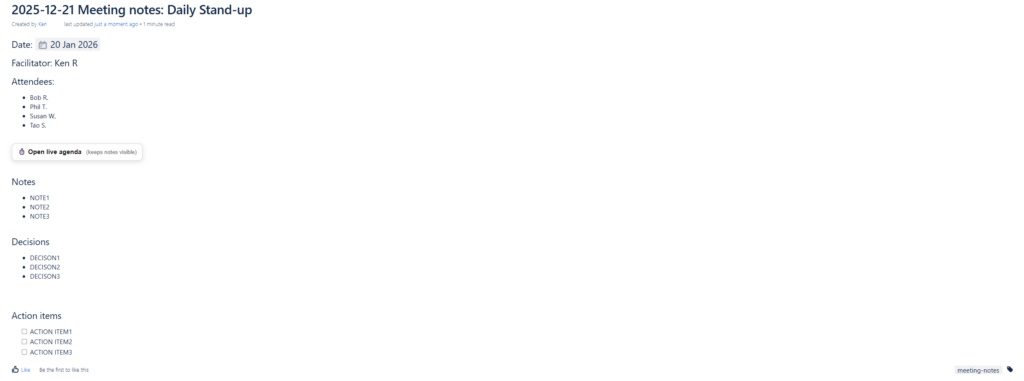
At the start of the meeting, the facilitator clicks the button.
📸 Screenshot callout #2
AgendaGlow opens as a compact floating window on the right side of the screen while Confluence notes remain fully visible.
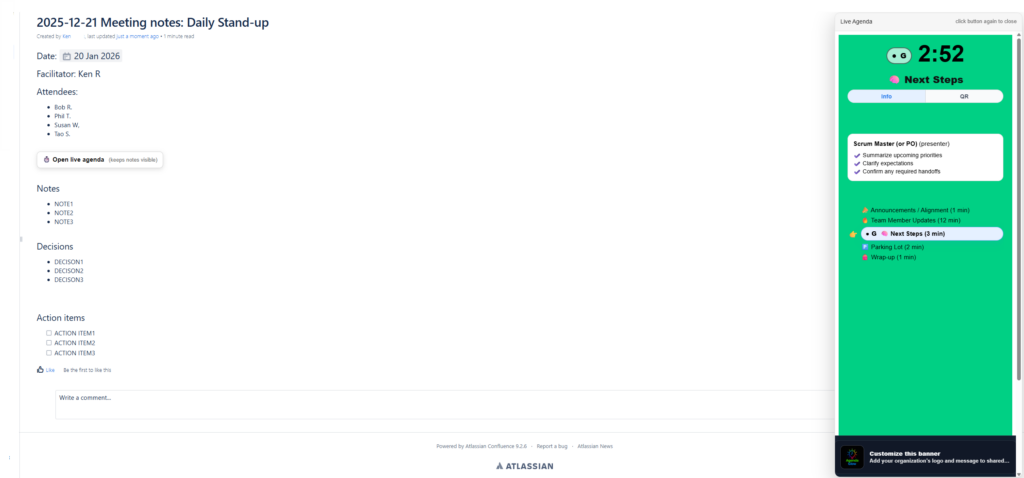
AgendaGlow shows:
- The current agenda item
- A live timer
- Visual pacing (on-time, approaching limit, overtime)
Confluence stays focused on:
- Notes
- Decisions
- Action items
Each tool does what it’s best at.
Why this works especially well in enterprise environments
This pattern works even in locked-down corporate setups because:
- ✅ No Confluence Marketplace app required
- ✅ No admin or IT approval
- ✅ No data duplication
- ✅ Easy to adopt or remove
- ✅ Respects existing Confluence usage
Teams can try it immediately, without changing how their documentation works. Confluence is widely used as a documentation platform across engineering and product teams (Atlassian Confluence).
Setting it up takes about two minutes
- Create your agenda in AgendaGlow
- Copy the live viewer link
- Add an HTML block to your Confluence page
- Paste a small button snippet
- Run your meeting
That’s it.
(We provide a ready-to-copy Confluence template below.)
When to use the Live Companion Pattern
This works particularly well for:
- Daily stand-ups
- Weekly team meetings
- Program and project syncs
- Retrospectives
- Cross-functional reviews
Anywhere pacing, focus, and time discipline matter. AgendaGlow Confluence meetings work best when Confluence remains the system of record and AgendaGlow acts as the live meeting companion.
A simple Confluence meeting template
Below is an example of how teams structure their pages when using the Live Companion Pattern.
📅 Meeting: {{Meeting Name}}
Date:
Facilitator:
Attendees:
▶ Run the live agenda
(Keeps notes visible while the meeting runs)
<div style="margin: 12px 0;">
  <a
    href="https://agendaglowviewer.dozenred.com/view/SESSION_ID"
    target="_blank"
    rel="noopener noreferrer"
    style="
      display:inline-block;
      padding:10px 14px;
      border-radius:8px;
      border:1px solid rgba(0,0,0,0.15);
      background:#ffffff;
      box-shadow:0 4px 12px rgba(0,0,0,0.10);
      text-decoration:none;
      color:#111;
      font-weight:600;
    "
  >
    ⏱️ Open Live Agenda
  </a>
</div>
📝 Notes
✅ Decisions
📌 Action Items
| Action | Owner |
|---|
AgendaGlow Confluence meetings vs plugins and integrations
Many teams assume the only way to improve meetings in Confluence is by installing a Marketplace plugin or building a deep integration. In practice, that often creates more friction than value.
Plugins typically require:
- Confluence admin approval
- Security and compliance reviews
- Ongoing maintenance
- User training
AgendaGlow Confluence meetings take a different approach.
Instead of embedding deeply into Confluence, AgendaGlow acts as a live companion—a dedicated runtime focused on pacing, timing, and flow. Confluence remains the system of record, while AgendaGlow keeps the meeting on track.
This separation has several advantages:
- Teams can adopt it immediately
- There is no risk to existing Confluence content
- The pattern works across teams, departments, and enterprises
- The meeting experience improves without changing documentation habits
For organizations that value flexibility and low-friction adoption, this pattern scales far better than traditional integrations. For teams already running AgendaGlow Confluence meetings, this pattern becomes second nature after just one or two sessions.